

If you’ve typed “txmyzone” into a search bar and landed on a fitness app you didn’t quite recognize, you’re not alone. The term itself causes a bit of confusion, but once you understand what it points to, the picture becomes clear fast.
“txmyzone” is widely understood as a search variation of Myzone — a heart-rate-based workout tracking platform that’s become a staple in gyms, personal training studios, and home fitness setups across the globe. Whether the “tx” crept in as a typo, a regional abbreviation, or a gym-specific tag, the destination is the same: a fitness ecosystem built around effort, not just performance numbers.
This article covers everything you’d want to know — what the platform does, how the app functions, who it’s for, and whether it’s worth your time.
What Is txmyzone (Myzone)?
Myzone is a fitness tracking platform that centers on one idea: your effort matters more than your raw output. Instead of competing against someone else’s pace or lift total, you’re measured against your own maximum heart rate. That shift in philosophy is what makes it different from most fitness wearables on the market.
The platform was built specifically for gym and group fitness environments, though it works just as well for solo training. It pairs a wearable device (or a compatible smartwatch) with a mobile app to give you live feedback during workouts — and a detailed breakdown afterward.
How Does Myzone Measure Effort?
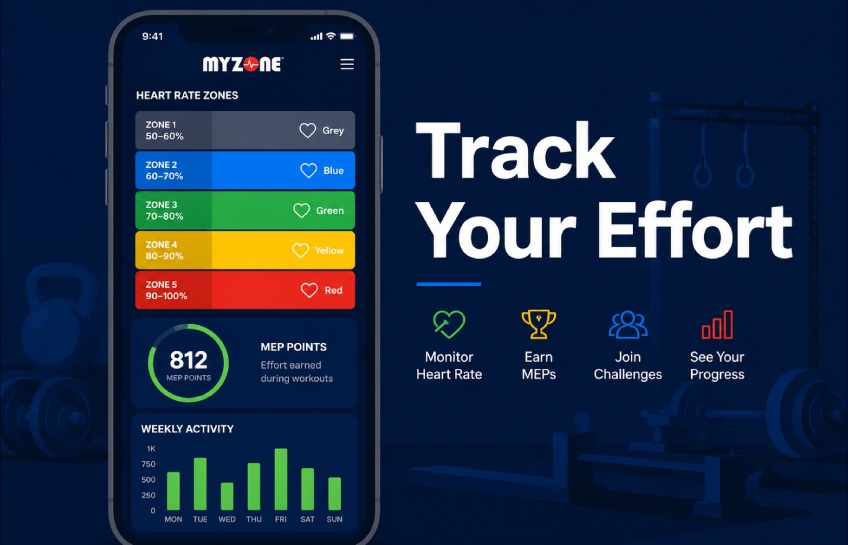
Myzone calculates effort using heart-rate zones. Your heart rate is expressed as a percentage of your maximum, and that percentage places you in one of five color-coded zones — from grey at the low end to red at the top. The higher the zone, the more Myzone Effort Points (MEPs) you earn per minute.
This approach levels the playing field. A 60-year-old working at 85% of their max heart rate earns the same MEPs as a 25-year-old athlete doing the same. It rewards the work, not the fitness level.
What Are MEPs (Myzone Effort Points)?
MEPs are the currency of the Myzone system. You earn them in real time as you train, and they accumulate over days, weeks, and months. Myzone recommends aiming for 1,300 MEPs per month as a general health benchmark — a target that aligns with World Health Organization physical activity guidelines for adults.
The point system does two things well: it gives you a concrete goal to chase, and it makes your effort visible to others in your gym or challenge group.
How the txmyzone App Works
The Myzone mobile app is the control center for everything the platform tracks. It’s available on both iOS and Android, and once paired with your device, it starts pulling in data automatically.
Setting Up the App
Getting started is straightforward. You create a profile, enter a few basic stats, and connect your wearable. The app uses that initial data to estimate your maximum heart rate — something it refines over time as it collects more workout data from you specifically.
From there, every session is logged automatically. You don’t need to manually start or stop tracking for most workouts.
Live Workout Tracking
During a session, the app displays your current heart rate, your active zone (color-coded), and your MEP count in real time. If your gym has Myzone wall tiles — those large TV screens showing participant data — your name and zone appear there too. That public visibility creates a kind of low-pressure accountability that group fitness instructors love.
Activity Dashboard and History
After each workout, the app gives you a full breakdown: total MEPs earned, time spent in each zone, average heart rate, and calorie estimates. Over time, this builds into a proper training log. You can track weekly consistency, monthly effort totals, and how your fitness trends are moving.
Key Features of txmyzone at a Glance
| Feature | What It Does |
|---|---|
| Heart-rate zones | Tracks intensity in real time using 5 color-coded zones |
| MEP points | Rewards effort rather than raw speed or strength |
| Community feed | Lets you follow friends, coaches, and group members |
| Challenges | Time-based competitions between users or gym members |
| Smartwatch support | Works without a chest strap on supported devices |
| Workout history | Detailed logs going back to your first recorded session |
| Live gym display | Shows real-time data on gym screens during classes |
Who Uses txmyzone?
The platform has a broad user base, which is part of why it’s grown so quickly inside the fitness industry.
Gyms and Fitness Studios
Most commercial Myzone setups are gym-led. Fitness clubs license the platform and integrate it into their classes — displaying live heart rate data during HIIT sessions, cycling classes, or bootcamps. It gives instructors an at-a-glance view of who’s pushing hard and who might need encouragement.
Personal Trainers
Individual trainers use Myzone to monitor clients during sessions and assign MEP-based homework between appointments. If a client needs to hit 400 MEPs before their next session, the trainer can verify it directly through the app.
Home and Independent Exercisers
You don’t need a gym membership to use Myzone. Plenty of people use it solo — for runs, cycling, home workouts, or general activity tracking. The community features still work regardless of where you train.
Beginners
Honestly, Myzone suits beginners well. Because the system is based on your own maximum heart rate (not anyone else’s), you’re not immediately compared to experienced athletes. Your effort is valid at any fitness level.
Is txmyzone Free to Use?
The app itself is free to download, but accessing full functionality typically requires a Myzone wearable device. Here’s how the pricing structure generally breaks down:
The MZ-Switch is Myzone’s current flagship device — it can be worn on the chest or wrist and pairs with the app over Bluetooth. Some gym memberships include a device as part of their package.
If you already own a compatible Apple Watch or Android smartwatch, you can use Myzone without purchasing additional hardware. The accuracy may vary slightly compared to a chest strap, but for most users it’s more than adequate.
Free features through the app include basic activity logging and some community functions. The full challenge and analytics suite requires device pairing.
What Devices Are Compatible With txmyzone?
Device compatibility has expanded significantly over the past few years. You’re no longer limited to Myzone’s own hardware.
Myzone’s Own Devices
- MZ-Switch — wrist or chest wear, Bluetooth and ANT+ connectivity
- MZ-Vibe — chest strap with haptic feedback during workouts
Third-Party Compatible Devices
- Apple Watch (Series 3 and newer) — pairs directly with the Myzone app
- Android smartwatches — selected models with heart-rate Bluetooth broadcasting
- Garmin devices — via ANT+ broadcasting to compatible gym equipment
- Most Bluetooth heart-rate monitors — if they broadcast standard heart-rate data
If you’re unsure whether your device works, the Myzone support page maintains a current compatibility list.
Why Do Users Stick With Myzone?
User retention tends to be high on this platform, and the reasons aren’t complicated.
Effort-Based Motivation Works
When you’re not competing against someone else’s fitness level, showing up feels less intimidating. A lot of users report that MEPs give them a daily target that feels achievable — even on low-energy days. Hitting your zone for 20 minutes still earns points, and those points still count.
The Community Element Adds Accountability
The social feed inside the app lets you see when friends and gym members complete workouts. It’s not a social media scroll — it’s a focused fitness feed. That visibility creates a soft layer of accountability that keeps a lot of users consistent.
Challenges Keep Things Fresh
Monthly MEP challenges — either gym-wide or between friend groups — give users a reason to train with a bit more intention. Competing for a spot on a leaderboard is a simple motivation tool, but it works.
Are There Any Limitations Worth Knowing?
No platform is perfect, and Myzone has a few genuine limitations worth flagging before you commit.
Wrist-Based Accuracy
Like most wrist-worn heart rate monitors, accuracy can dip during high-intensity movements — particularly strength training or anything involving a lot of wrist movement. A chest strap gives noticeably more reliable data if precision matters to you.
Connectivity Issues
Some users report occasional syncing delays between the device and the app, particularly on older Android phones. The issues are typically minor and resolved with a restart, but it’s worth noting.
Gym Dependency for Full Experience
The platform’s best features — live wall displays, class-based challenges, instructor monitoring — require gym infrastructure. Solo users still get value, but the full experience is designed around a facility context.
Can Beginners Use txmyzone?
Yes, and this is actually one of Myzone’s better design choices. The onboarding process is simple — create a profile, pair a device, and start moving. The app walks you through zone explanations without assuming any prior knowledge.
Because MEPs are tied to your personal heart rate maximum (not a fixed standard), a beginner doing a brisk walk earns valid points. There’s no “minimum fitness level” to participate meaningfully.
The color-coded zones also make effort self-explanatory. Green means moderate. Yellow means you’re pushing. Red means you’re working hard. No sports science degree required to interpret the feedback.
txmyzone vs. Other Fitness Trackers
It’s worth briefly comparing Myzone to what else is out there, because the positioning is genuinely different.
Most fitness trackers — think Fitbit, Apple Health, or Garmin Connect — focus on data collection. They track steps, sleep, calories, and heart rate, but they don’t inherently reward effort or build community around workouts.
Myzone’s differentiation is the MEP system and the gym integration layer. If you train in a social environment and want your effort recognized beyond raw numbers, Myzone fills a gap that general fitness wearables don’t address.
For pure data depth, Garmin leads. For sleep tracking, Fitbit or Apple Watch. For effort-based fitness community tracking in a gym context, Myzone has built something genuinely distinct.
FAQ: txmyzone / Myzone
Q: Is txmyzone the same as Myzone? Yes. “txmyzone” is a common search variation — likely a typo or regional abbreviation — that consistently points to the Myzone platform. They refer to the same app and wearable system.
Q: Do I need to buy a device to use Myzone? Not necessarily. If you have a compatible Apple Watch or Android smartwatch with heart-rate Bluetooth broadcasting, you can connect it to the Myzone app without purchasing additional hardware.
Q: How accurate is Myzone’s heart rate tracking? Chest strap accuracy is very high — generally within 1–2 BPM of medical-grade monitors. Wrist-based tracking is accurate enough for general fitness use, though it can be less reliable during high-intensity strength movements.
Q: What is the recommended monthly MEP target? Myzone’s standard recommendation is 1,300 MEPs per month, which aligns with general guidelines for moderate to vigorous physical activity in healthy adults.
Q: Can I use Myzone without a gym membership? Yes. The app works for solo training — running, home workouts, cycling, or any other activity. You won’t get the gym display features, but all personal tracking, history, and community functions are available.
Q: How does Myzone compare to Apple Watch fitness tracking? Apple Watch offers broader health monitoring (ECG, blood oxygen, sleep). Myzone focuses specifically on workout effort and gym community features. Many users use both — Apple Watch for daily health data, Myzone for structured workout tracking.
Q: Is Myzone suitable for older adults or beginners? Yes. The effort-based scoring model is designed to be inclusive across fitness levels. An older adult training at their personal threshold earns the same zone points as a younger, fitter athlete working at theirs.
Final Thoughts
txmyzone — or more accurately, Myzone — is a fitness tracking platform with a clear identity. It isn’t trying to be a full health monitor or a step-counter. It’s built specifically around workout effort, gym community, and consistent activity habits.
The MEP system is clever because it removes the comparison problem that makes many fitness apps feel discouraging. You’re measured against yourself. That alone makes it worth considering if motivation and consistency are what you’re trying to build.
If you train in a group environment or your gym already runs Myzone, getting set up takes less than 15 minutes. If you’re training solo, the app still delivers useful tracking — though you’ll get more out of it once you’ve connected with a challenge group or community.
Before You Go, Read This:New Software Name Mozillod5.2f5: What It Does and Who It’s For


No Comment! Be the first one.