

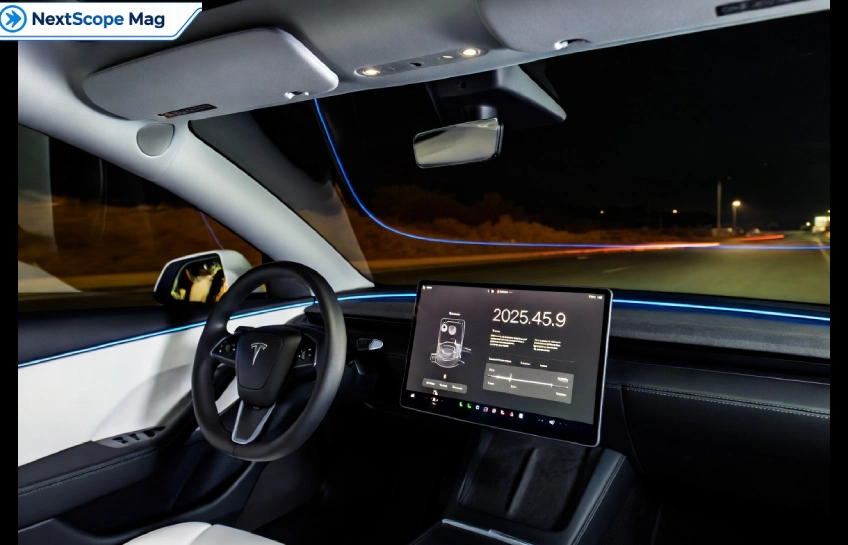
The Tesla software update 2025.45.9 focuses on Full Self‑Driving (Supervised) v14.2.2.4 and a batch of small but useful driving, safety, and comfort tweaks. It mainly refines how FSD sees the road, handles obstacles, and guides you to your destination while adding a few quality‑of‑life tools inside the car.
If you’re wondering what’s actually new in 2025.45.9, this guide breaks it down in plain language: FSD changes, Arrival Options, Speed Profiles, dashcam updates, safety alerts, and everyday convenience features. You’ll also see how widely the update is rolling out and what owners are saying so far.
What Is Tesla Update 2025.45.9?
Tesla update 2025.45.9 is a firmware release that bundles Full Self‑Driving (Supervised) v14.2.2.4 with several new features and refinements across navigation, safety, and in‑car apps. It’s currently rolling out to FSD‑enabled cars in the US and Canada, with a growing share of the fleet receiving it over time.
Unlike a huge version jump, 2025.45.9 is an incremental step over v14.2.2.3, but it still matters if you use FSD daily. The release notes largely match the previous FSD build, yet the underlying vision and fault‑handling changes aim to make driving smoother and more predictable. And for Cybertruck owners, it’s also one of the core FSD updates available on that platform as of early 2026.
Key Highlights in 2025.45.9
1. FSD Vision and Road Handling
The biggest change in 2025.45.9 is an upgraded neural network vision encoder, which lets FSD work with higher‑resolution visual features. In simple terms, the car should better recognize emergency vehicles, debris, obstacles, and even human gestures such as traffic controllers or people near the road.
This update also improves how FSD handles blocked roads, detours, static and dynamic gates, and tricky cases like unprotected turns and school buses. So the system is meant to choose better paths, offset around debris like tires or boxes, and pull over or yield properly when sirens appear behind you.
2. Arrival Options and Navigation
2025.45.9 introduces Arrival Options, which let you choose where FSD should park or stop when you reach a destination: parking lot, street, driveway, parking garage, or curbside. This feels small at first, but it gives more control in daily situations, such as picking someone up outside a store or choosing a more convenient drop‑off point.
Alongside that, Tesla improved navigation and routing, folding more of this logic into the vision‑based system. The update also adds automatic HOV lane routing and better Supercharger site maps, which helps when planning longer trips or managing charging stops.
3. Speed Profiles and Driving Style
Another notable feature in 2025.45.9 is Speed Profiles, which let you tweak how FSD behaves on the road. Owners often describe these profiles using playful names (like “Sloth” vs “Mad Max”), but the idea is simple: you can choose a calmer or more assertive driving style to match your comfort level and local traffic patterns.
Speed Profiles sit on top of existing FSD and cruise control settings, giving an extra layer of customization. For example, you might prefer a conservative profile for city driving with pedestrians and a more confident profile on open highways.
Safety and Dashcam Changes
1. Fault Management and Visibility Alerts
2025.45.9 includes under‑the‑hood changes to how FSD manages system faults and recovers from degraded operation. The goal is to reduce abrupt disengagements and make recovery smoother when the system hits edge cases or sensor issues.
There’s also a new alert for residue build‑up on the interior windshield that can affect front camera visibility. If the system detects this, it prompts you to clean the glass, which helps maintain accurate vision and can affect how strict attention monitoring feels. It’s a small reminder, but it connects clean hardware to stable FSD performance.
2. Dashcam Clips and Viewer
Another visible change in 2025.45.9 is how dashcam clips are stored and displayed. Clips now include extra metrics such as speed, steering wheel angle, and self‑driving state, giving you more context if you review footage after an incident or a surprising FSD maneuver.
The Dashcam Viewer also gets an update, making it easier to browse and understand recordings directly on the car’s screen. For owners who like to document drives or analyze FSD behavior, these changes add more useful data without needing separate tools.
Everyday Comfort and Fun Features
1. In‑Car Apps and Modes
Tesla update 2025.45.9 isn’t only about driving; it brings several fun and comfort features too. You’ll find additions such as Tesla Photobooth, Santa Mode tweaks, a refreshed Light Show, a Paint Shop upgrade, and the SpaceX Docking Simulator. These are optional extras, but they keep the car feeling fresh and give you more to play with when parked.
Dog Mode also gets Live Activity on iOS, letting you check on your pet from your phone while Dog Mode keeps the cabin comfortable. For many owners, that’s more valuable than any visual Easter egg, because it turns the car into a safer waiting space for animals.
2. Phone and Charging Convenience
On the practical side, 2025.45.9 adds alerts like Phone Left Behind and Phone Left on Wireless Charger so you don’t walk away without your device. There’s also “Save Charge Limit by Location,” which remembers your preferred charge limit for specific places, such as home or a regular workplace charger.
These small details don’t change how FSD drives, but they make the car easier to live with day‑to‑day. And as more updates like 2025.45.9 roll out, these small touches accumulate into a noticeably more comfortable ownership experience.
Rollout, Availability, and User Feedback
The rollout of 2025.45.9 is tracked by tools like Tessie, TeslaFi, and EV‑Inventory, which show adoption charts and heat maps across regions and models. As of late June 2026, only a portion of the FSD‑enabled fleet has this build, with Tesla gradually expanding access rather than pushing it to all cars at once.
Community threads and groups for Model Y, Cybertruck, and other Tesla models report that 2025.45.9 and the point‑release 2025.45.9.1 share the same FSD version and release notes. Owners see these follow‑up builds mainly as bug‑fix releases, not major feature additions. Some users report smoother behavior or fewer quirks, while others notice little difference, which is typical for small FSD revisions.
Overall, if you rely on FSD (Supervised), 2025.45.9 is worth installing because it improves vision, fault handling, detour management, and arrival behavior, while adding several comfort and entertainment features. And since Tesla continues to ship point releases on top of this build, staying updated helps you benefit from ongoing refinements.



No Comment! Be the first one.