

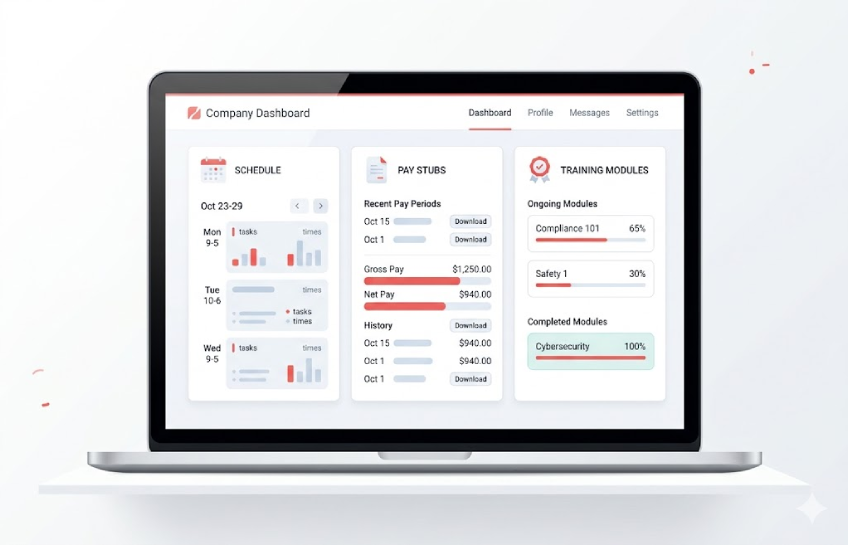
If you work at Chick-fil-A and someone tells you to “check CFA Home,” you might wonder what that even means. CFA Home — also known as cfahome.com — is Chick-fil-A’s internal employee portal. It’s a private, password-protected website where staff can access schedules, pay stubs, benefits, training, and a whole lot more. It’s not the public Chick-fil-A website that customers use to order food. This one is strictly for the people who work there.
Whether you’re a new team member trying to figure out your first schedule or a shift leader who needs to pull up a payroll report, cfa home is where you’ll spend a fair amount of your time. This article walks through everything — what it is, how to log in, what’s inside, and what to do when something goes wrong.
What Is CFA Home and Who Is It For?
CFA Home is Chick-fil-A’s central employee portal. Think of it as the company’s private hub — one place where all the work-related tools and information live. It’s designed to serve everyone from part-time team members to full-time directors and franchise operators.
Here’s a quick look at who uses it and how:
- Team members – Check schedules, view pay stubs, and complete training
- Shift leaders – Monitor clock-in records, manage daily operations
- Operators and franchise owners – Review performance scores and guest feedback
- Directors – Access compliance data, audit scores, and operational documents
- HR managers – Handle onboarding documents, benefits administration, and staff records
It’s worth being clear about one thing: CFA Home is completely separate from the regular Chick-fil-A website that customers use. The employee portal requires a username and password, and it’s only accessible to people with active Chick-fil-A credentials. If someone doesn’t work there, they can’t get in.
Key Features and Tools Inside CFA Home
Once you’re logged in to cfa home, you’ll find it’s more of a connected hub than a single page. Several tools and systems are all accessible from one place, which keeps things from being scattered across a dozen different apps.
Here’s what employees can find inside:
- Work schedule – View upcoming shifts and plan your week
- Time-punch records – Check your clock-in and clock-out history
- Pay stubs and payroll – Review your earnings and past payments
- Benefits information – Health, vision, dental, 401k, and vacation pay details
- Company news – Seasonal menu updates, corporate announcements
- Pathway 2.0 – Chick-fil-A’s training platform, accessed directly through the portal
- Machine and operations manuals – Helpful for store staff and operators
- HR forms – Onboarding paperwork, uniform orders, policy documents
- Guest feedback and scores – CEM, Ecosure, and Deloitte performance data
For team members, the most used features are schedules and pay. For management, the operational reports and compliance tools get a lot of attention. The portal basically serves different people in different ways, but it’s all sitting in one spot.
How to Access CFA Home – Step-by-Step Login
Getting into cfa home isn’t complicated once you have your credentials. The portal uses Okta, which is a secure identity management system, to handle authentication. Here’s how the login process works:
- Open a web browser and go to cfahome.com
- Click the sign-in button to begin
- You’ll be directed to the Okta authentication page
- Enter your Chick-fil-A username and password
- Complete multi-factor authentication if prompted — this is usually a text code sent to your phone
- Once verified, you’ll land on the CFA Home dashboard
A few things worth noting before you try logging in:
- You’ll need credentials from your store or HR team — these aren’t self-generated
- The portal works on both desktop and mobile browsers
- First-time users may need to set up an Okta account before the initial login works
If you haven’t received your login details yet, the best move is to talk to your store manager on your first day. They handle access setup or can contact whoever manages employee credentials at your location.
Managing Your Work Schedule, Pay, and Benefits
One of the main reasons employees check cfa home regularly is to stay on top of their schedule and pay. Instead of waiting for a paper schedule or chasing someone down to ask about a paycheck, everything is visible online as soon as it’s updated in the system.
Work Schedule
Your schedule shows all upcoming shifts. If anything changes — a swap, a shift added, or a time adjustment — it’ll show up in the portal right away. This makes planning your week much easier, especially for part-time staff juggling other commitments.
Pay Stubs and Payroll History
Through cfa home, employees can view individual pay stubs, check their hourly rate, and look back at their payment history. This is useful when tax season comes around or if there’s ever a question about whether a paycheck was processed correctly. No need to wait for a paper slip.
Benefits
The benefits section is particularly important for anyone who wants to understand what Chick-fil-A offers. Here’s what employees can typically find:
- Health insurance (medical, vision, dental)
- 401k retirement plan enrollment and contribution details
- Educational assistance programs
- Vacation and paid time off balances
- Free meals benefit information
For part-time team members, benefit eligibility can vary. It’s worth checking the benefits section directly or asking an HR contact to confirm what applies based on your hours and employment status.
Training and Development Through Pathway and Pathway 2.0
Chick-fil-A has its own training platform called Pathway, and the updated version is Pathway 2.0. Both are accessed directly through cfa home, so employees don’t need a separate login just for training.
What Pathway Covers
Pathway is where Chick-fil-A staff complete their required training. It covers store setup, cleaning procedures, food safety, customer service standards, and role-specific tasks. New hires are usually expected to finish certain Pathway modules before their first shift on the floor.
What’s Different About Pathway 2.0
The updated version is more interactive and better organized than the original. Some of the key improvements include:
- Video tutorials for step-by-step store procedures
- Training modules sorted by role (team member, shift leader, manager, etc.)
- Quizzes and knowledge checks after each module
- Progress tracking so managers can see who has completed what
Staff who stay on top of their Pathway training tend to pick things up faster and make fewer mistakes during busy shifts. Managers often check Pathway completion as part of their team oversight, especially for newer hires.
Operations, Reports, and Compliance Tools in CFA Home
For managers, operators, and directors, cfa home goes well beyond scheduling and paychecks. It’s where they track how the store is actually performing day to day.
The operations section includes:
- SafeDaily reports – Daily safety and cleanliness check results
- eRQA data – Quality assurance reporting
- Guest feedback reports – Direct customer satisfaction data
- CEM scores – Customer Experience Metrics that show how guests rate visits
- Ecosure scores – Food safety and sanitation performance ratings
- Deloitte audit scores – Third-party operational assessments
These numbers aren’t just for show. If a store’s Ecosure score drops, management can look at the data and figure out what caused it before it becomes a repeat issue. Guest feedback also helps identify specific trouble spots — whether it’s drive-thru speed, order accuracy, or staff friendliness.
Seasonal menu updates and company-wide announcements also come through cfa home, so everyone stays informed without needing a separate email chain or a notice board in the break room.
Common CFA Home Login Problems and How to Fix Them
Login issues are the most-searched topic when people look up cfa home, so here’s a straightforward breakdown of the most common problems and what to do about them.
Forgot Password
- Click “Forgot Password” on the Okta login page
- A reset link will be sent to your registered email or phone number
- Follow the steps to set a new password, then log back in
Account Locked
- This usually happens after too many failed login attempts
- Use the “Unlock Account” option on the login screen
- If that doesn’t work, contact your store manager or request IT support
Site Not Loading
- Clear your browser’s cache and cookies and try again
- Switch to a different browser — Chrome and Firefox tend to work well
- Check your internet connection to make sure it’s stable
- If the issue continues, it may be a temporary server problem — wait a few minutes and try again
Login Page Not Redirecting to Okta
- Update your browser to the latest version
- Temporarily disable browser extensions, which sometimes interfere with redirects
- Try opening the page in a private or incognito window
If none of these steps work, the best next step is to tell your store manager directly. They have access to Chick-fil-A’s internal IT support and can escalate account issues that self-service options can’t fix.
Security, Privacy, and Best Practices for Employees
Since cfa home holds personal information — schedules, pay details, HR data — keeping your account secure is important. Here are the basics every employee should follow:
- Never share your login credentials with anyone, including coworkers or friends
- Don’t use public Wi-Fi to log in unless you’re on a secure connection
- Always log out after finishing, especially on a shared device
- Enable multi-factor authentication if it’s optional at your location — it’s worth the extra step
- Use a strong, unique password that you don’t use anywhere else
Chick-fil-A’s internal policies also apply when accessing the portal. Employees should only look at information relevant to their role and shouldn’t share company data outside of official channels. If anything seems off with your account — like a login from a location that isn’t yours — report it to a manager right away.
FAQs About CFA Home for New Chick-fil-A Employees
Is CFA Home required for all employees? Yes, in most cases. Schedules, training, and payroll are all managed through the portal, so nearly every employee will need access at some point. New hires typically get their credentials during onboarding.
Can you apply for jobs through CFA Home? No. CFA Home is for existing employees only. Job applications go through separate Chick-fil-A channels, not through the employee portal.
What should you do if you haven’t received login details on your first day? Let your manager know immediately. They can create your account or escalate the issue to whoever handles onboarding at your location. Don’t wait — getting access early makes your first week go much smoother.
Can part-time employees access CFA Home? Yes. Part-time team members can log in the same way as full-time staff. Some benefit sections may show different eligibility details depending on employment status and hours worked.
Does CFA Home work on a phone? Yes, the portal works in mobile browsers on both Android and iOS. There isn’t a dedicated CFA Home app, but the website is fully functional on smartphones.
Final Thoughts
CFA Home is one of those tools that becomes second nature once you know your way around it. Whether someone is checking their schedule before a shift, reviewing a pay stub, or completing Pathway training, it keeps everything in one accessible place. Getting familiar with the portal early — especially the login process and where key features live — saves a lot of back-and-forth with managers and avoids unnecessary confusion.
If you’re new to Chick-fil-A, the first thing to do is get your Okta credentials sorted on day one, bookmark cfahome.com, and spend a few minutes exploring the sections that apply to your role. The more comfortable you are with it, the less time you’ll spend chasing down basic information.
For more articles about employee tools, workplace portals, and how companies like Chick-fil-A manage their operations, bookmark this page and check back regularly.



No Comment! Be the first one.